
Aegis AEG-Controller-EV Handheld Portable Sony FCB Controllers
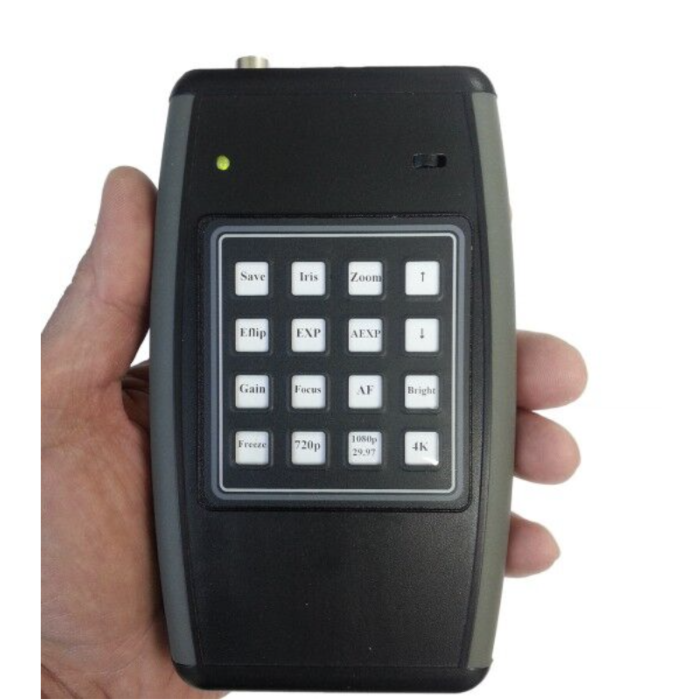
QUICK OVERVIEW
Sleek, Portable, Handheld controllers ideal for the Sony FCB block cameras including FCB-ER9500, FCB-ER8530, FCB-EW9500H, FCB-EV9520L, FCB-EV9500L and FCB-EV9500M.
- SKU
- AEG-Controller-MP1
Request a Quote
Flexible, configurable controllers designed to work with Sony FCB cameras. These controllers can be programmed to control a majority of Sony FCB camera functions. Custom program configurations are available. A sales representative can assist in determining the best configuration to meet individual needs.
Features:
For the Sony FCB block cameras, the controller can be configured to control:
- Power - On/Off
- Zoom - Tele
- Zoom - Wide
- Zoom Speed
- Digital Zoom - On/Off
- Focus - Far
- Focus - Near
- Focus - Auto/Manual
- Freeze
- Iris - Open/Close/Reset
- Image Flip
| Popular Controller Functions | |
| Save | Saves current camera settings, to be the default camera state for future camera power-ups. |
| Iris | Opens and closes the lens iris which controls amount of light that comes in and out. Use up and down keys to increase or decrease iris. |
| Zoom | Activates up and down arrows for controlling the lens, press zoom button the zoom by pressing the up arrow (tele end) and down arrow for (wide end). |
| Up and Down Arrows | These buttons are activated by Iris, Zoom, EXP, Gain, Focus, & Bright. The up arrow will increase (+) while the down arrow decreases (-). |
| E-Flip | This function turns the video output from the camera upside down. |
| Mirror | This function switches image from left to right. |
| EXP | Sets the camera in Manual Exposure mode 22 steps ranging from 1/1 shutter to 1/10000 . Use up and down keys to increase or decrease shutter speed. |
| AEXP | Auto exposure will allow video signal to output the optimum image for subjects from low light conditions to bright light conditions. |
| Gain | Changes the db of the camera, through 24 manual steps. Use up and down keys to increase or decrease gain. |
| AF | Sets the camera in auto focus mode. |
| Focus | Sets the camera in manual focus mode, Use up and down keys adjust focus. |
| Freeze | This function captures an image in the field memory and displays image on screen. |
| BLC | When the background of the subject is to bright, back light compensation will automatically adjust and make the subject bright and the background darker. |
| 720P 60 | Sets the camera into 720P 60fps mode, camera must be powered down in order for the change to take place. |
| 1080i 60 | Sets the camera into 1080i 60fps mode, camera must be powered down in order for the change to take place. |
| 1080P 30 | Sets the camera into 1080P 30fps mode, camera must be powered down in order for the change to take place. |
| Specifications | |
| Dimensions | HxWxL (MM) 20x148X85 |
| Power | 12V DC via the 4pin jack or 9V DC battery |
